
Compatibility
Minecraft: Java Edition
Platforms


Creators

Details
Licensed ARR
Published 3 months ago
Updated 3 months ago

❤️ Damage Indicators
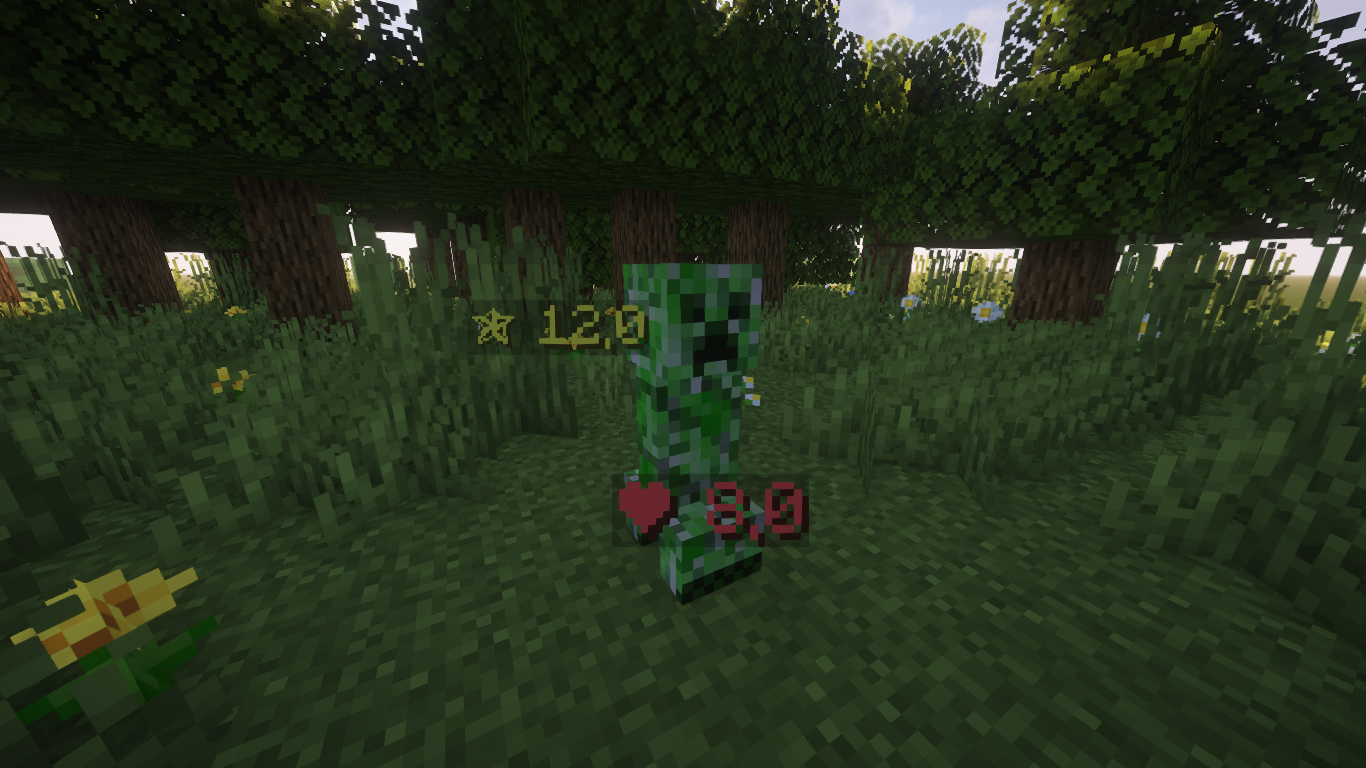
Damage Indicators displays clear, real-time damage indicators above players and mobs, making it easy to see hits in PvP and PvE.




✨ Features
- Visual damage indicators
- Optimized for PvP and PvE
- Minimalist and performance-friendly
- Customizable via
.ymlconfiguration
⚙️ Configuration
Customize the indicators via the config file:
config.yml
# -------------------------------------------------- #
#               DamageIndicators Config              #
# -------------------------------------------------- #

# Master switch for the plugin.
# If set to false, no indicators will be shown.
# You can also change this setting with the `/di toggle` command. (default: true)
enabled: true

# Text to appear at the beginning of the damage indicator.
# You can use color codes with '&' (default: '&c❤ ')
indicator-prefix: '&c❤ '

# Time the damage indicator stays on screen (in secs)
# You have to use decimal (double) values (default: 1.5)
indicator-duration-seconds: 1.5

# World Blacklist
# List the names of the worlds where you want to disable damage indicators.
disabled-worlds:
# - "world_lobby"
# - "towny"
🛠️ Installation
- Download the plugin
.jarfile. - Place it into your server's
pluginsfolder. - Restart the server or use
/reload. - Customize
plugins/DamageIndicators/config.yml.
🎯 Usage
- Damage indicators for players and mobs are automatically active.
- Config changes are adjustable via
.yml, some require reload. - Optimized for both PvP and PvE servers.
⚡ Commands
| Command | Description |
|---|---|
/di help |
Displays information about the plugin. |
/di reload |
Reloads the plugin configuration without restarting the server. |
/di toggle |
Toggle damage indicators on/off. |
😎 Preview
— Made by Lightre