Compatibility
Minecraft: Java Edition
Platforms
Supported environments


Creators
Details
Embellish Chat for Fabric
Embellish Chat is a Fabric mod that enhances the chat experience on Minecraft servers. It makes player communication more expressive and convenient with Discord-like Markdown-style formatting, mentions, clickable links, and mention notifications.
✨ Key Features
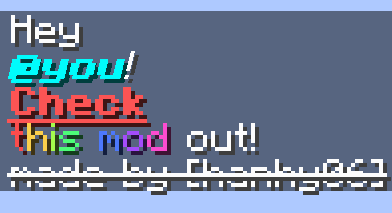
- Markdown‑Style Formatting: Bold, italic, underline, strikethrough, obfuscation, color, custom font, and links. Works in public chat, private messages, and commands.
- Mention System: Mention individual players, your team, everyone, or nearby players with
@. Online targets receive a notification; mentions auto‑tint to the player/team color. - Message Metadata: Hover to see the send time, and click a message to copy it to the clipboard.
🛠️ Markdown Usage
Use the following patterns directly in the chat window:
| Feature | Syntax | Example | Preview |
|---|---|---|---|
| Bold | **Text** |
**You really need to read this!** |
 |
| Italic | _Text_ |
_This is top secret..._ |
 |
| Underline | __Text__ |
__Check this out__ |
 |
| Strikethrough | ~~Text~~ |
~~We don’t talk about this anymore~~ |
 |
| Obfuscated | ||Text|| |
||Unreadable text|| |
 |
| Color (Hex) | [Text]<#RRGGBB> |
[Blue]<#0000FF> like the deep ocean |
 |
| Color (Gradient) | [Text]<#RRGGBB #R...> |
[Grraaaaaaadieeeeent]<#ffaaaa #aaaaff #aaffaa> |
 |
| Color (Preset) | [Text]<preset> |
[pink]<pink> pig |
 |
| Color (Rainbow) | [Text]<RAINBOW> |
look at this [rainbow]<RAINBOW> |
 |
| Link | [Text](URL) |
Download it [here](https://modrinth.com/mod/embellish-chat) |
 |
| Font | [Text]{path} |
[Blorp Zorp]{minecraft:alt} |
 |
| Mention | @PlayerName |
Hello, @User |
 |
Notes
- For security, the Link feature only recognizes URLs using the
https://protocol.- Preset values depend on the mod's configuration (e.g.,
pink,blue, etc.).pathfor Font accepts a namespaced ID such asminecraft:alt.- If multiple style types exist and no preset is configured, the user can enter one manually. The separator can be checked through /ec help style.
- The table above shows only the most common styles. Embellish Chat supports many additional style types. For more details, please refer to StyleWiki.md
🗣️ Mention System
| Target | Behavior |
|---|---|
@Player |
Mentions a specific player. If the player is online, the mention adopts the player’s display name style. If the player is offline or does not exist, it still follows the player's team style if available. |
@team(name) |
Mentions all players in the specified team. |
@group(name) |
Mentions all players in the specified LuckPerms group. |
@everyone |
Mentions all players on the server. |
@here |
Mentions all players within a configurable radius in the same world as the sender. The default radius is 64 blocks, adjustable in the configuration. |
@world(name) |
Mentions all players in the specified world. |
Notes
- Online mention targets receive a notification, and the message is automatically styled using the appropriate formatting rules.
- The mention notification sound uses the UI sound category by default. On Minecraft 1.21.5 and earlier, it falls back to the PLAYER category.
@group(name)requires LuckPerms. Without it, the mention resolves to no players.@teamand@Playermentions follow the color of their respective team. If the team has no color, thedefaultTeamColorvalue is used.- Other mention types can have their color customized by modifying the
styleRulevalue.- The table above shows only the most common mentions. Embellish Chat supports many additional mention types. For more details, please refer to MentionWiki.md
⌨️ Commands
-
/embellish-chat reload— Reloads the configuration fromconfig/embellish-chat.json. -
/embellish-chat ban <player>— Prevents the specified player from using any features provided by the mod. -
/embellish-chat pardon <player>— Restores access to all features provided by the mod for the specified player. -
/embellish-chat test regex <regex> <test>- Compiles the<regex>pattern and tests it against the<test>string. -
/embellish-chat test stress <count> <test>- Sends a simulated message containing<test>exactly<count>times with the permissions of the user who executed the command, and processes it the same way as a real message. -
/ec help mention- Displays the currently available mentions, how to use them, the mention targets, and the applicable style types. -
/ec help style- Displays the currently available styles, how to use them, the applicable style types, and the required input options. -
/ec notification- Allows you to decide whether to receive a notification when you are mentioned.
Notes
- All commands in the /embellish-chat family require OP level 2. On Minecraft 1.21.11 and later, this is checked using GAMEMASTERS_CHECK instead.
- Commands in the /ec family do not require any OP level and can be used by all users.
- Through
notificationCommandEnable, you can configure whether users are allowed to set their notification preferences using /ec notification. IfnotificationCommandEnableis false, the user’s preference is ignored and notifications are sent for all mentions.
⚙️ Configuration
The configuration file is located at: config/embellish-chat.json.
Sample
{
  // version
  "version": "2.6.0",

  //rules
  "stylingRules": {
    "embellish-chat.chat": [
      {
        "pattern": "\\[([^\\]]+?)]\\((https://.*?)\\)",
        "styles": [
          {
            "styleType": "URL",
            "preset": ""
          }
        ]
      },
      ...
    ],
    "embellish-chat.command_argument": []
  },
  "mentionRules": {
    "embellish-chat.mention": [
      {
        "pattern": "@here()",
        "title": "%player:displayname% mentioned you",
        "cooldown": 0,
        "sound": {
          "id": "minecraft:entity.experience_orb.pickup",
          "category": "UI",
          "volume": 1.0,
          "pitch": 1.75
        },
        "mentions": [
          {
            "mentionType": "INSIDE",
            "preset": "64"
          }
        ],
        "styles": [
          {
            "styleType": "BOLD",
            "preset": ""
          }
        ]
      },
      ...
    ]
  },

  // presets
  "delimiter": ",",
  "timestamp": "yyyy-MM-dd HH:mm:ss",
  "urlColor": "#0000EE",
  "colorPreset": {
    "dark green": "#00AA00",
    ...
  },
  "defaultTeamColor": "#FF55FF",
  "notificationCommandEnable": true,
  "mentionBroadcast": true,

  //player list
  "bannedPlayerList": [],
  "notificationOffPlayerList": []

  //discord
  "webhook": ""
}
Notes
- The
delimiteris internally processed using a regular expression. If you want to use a special character like|as a separator, please enter the escaped version of the delimiter.- If the
defaultTeamColorvalue is missing ornull, it will not be automatically colored.- You can specify the mention cooldown time (in seconds) through the config. When the cooldown time is set to 0, there are no restrictions.
- config-generator.html is a web configuration generator site for Embellish Chat. It was created using Gemini, so it may not be perfect.
Styling Configuration
Embellish Chat, powered by regular expressions, provides highly flexible styling for nearly any chat pattern imaginable. Since every message must be scanned, extremely large servers may experience additional overhead. (It is expected to have no significant performance impact on typical general servers.) Furthermore, creating custom rules can be challenging because regular expressions (regex) are inherently complex. We recommend using various AI tools for assistance with rule creation and optimization.
In this mod, the order of mention rules and styling rules is extremely important! Depending on the order, serious bugs may occur, so please be careful. The mod applies mentions and styling strictly from top to bottom in the given order.Style Rule Structure
This section defines the text styling rules.
Each rule consists of a regular expression (pattern) and a style action list(styles).
{
  "pattern": "\\*\\*(.+?)\\*\\*()",
  "styles": [
    {
      "styleType": "BOLD",
      "preset": ""
    }
  ]
}
- pattern Must contain two capturing groups:
- the text to apply the style to
- an optional captured value that can be passed as an argument.
- styles This is a list of style actions. Each action consists of a style type (
styleType) and style option preset(preset).
you can see more detail in StyleWiki.md
Mention Configuration
A mention rule is applied only when the message satisfies all targets specified in the rule — effectively using the intersection of all mention targets.
Mention Rule Structure
This section defines the mention rules.
regular expression (pattern), notification settings (title, cooldown, sound), mention action list(mentions) and style action list(styles).
{
  "pattern": "@here()",
  "title": "%player:displayname% mentioned you",
  "cooldown": 0,
  "sound": {
    "id": "minecraft:entity.experience_orb.pickup",
    "category": "UI",
    "volume": 1.0,
    "pitch": 1.75
  },
  "mentions": [
    {
      "mentionType": "INSIDE",
      "preset": "64"
    }
  ],
  "styles": [
    {
      "styleType": "BOLD",
      "preset": ""
    },
    {
      "styleType": "COLOR_PRESET",
      "preset": "light purple"
    }
  ]
}
- pattern must contain one capturing group, which represents the mention option. For example, this could be a team name or a LuckPerms group name.
- title The title that appears on the mentioned player's screen. Supports the Text Placeholder API, where %player:displayname% is the name of the player who sent the mention.
- cooldown Mention cooldown time in seconds. Set to 0 for no cooldown.
- sound Defines the notification sound settings. Contains
id(sound identifier),category(sound category),volume, andpitch. - mentions A list of mention actions. Each action specifies a
mentionTypeand an optionalpreset. - styles A list of style actions. Works the same way as in the styling rules section.
you can see more detail in MentionWiki.md
LuckPerms & Permission
This mod supports the permission features of LuckPerms and the Fabric Permissions API.
The keys in stylingRules and mentionRules represent each permission (such as chat, command, mention, etc.). These keys are default keys, and the system works even if they are not explicitly defined.
The mod checks from top to bottom and applies the rules registered for each permission.
The LUCK_PERMS_GROUP mention type requires LuckPerms.
If it’s not installed, these features have no effect.
Text Placeholder API
This mod supports dynamic data through the Text Placeholder API. The Text Placeholder API applies to the mention title, all presets used in rules, and any options that users can configure.
📊 Performance: Processing Time per Tick
Test Setup
These tests were performed in a synthetic stress environment to measure worst-case performance.
They do not represent normal server conditions.
-
Embellish Chat: 2.6.0 (DEV)
-
Minecraft: 1.21.10
-
World: Singleplayer, Superflat
-
CPU: 13th Gen Intel(R) Core(TM) i7-1360P
-
Max RAM for JVM: 2 GB
-
System: Windows 11
-
Config: Default
Test Scenario
For each test:
- The server was stressed with up to 500 chat messages per tick
(≈ 10,000 messages per second). - Each message was about 50 or 200 characters long.
- The server was kept under continuous load while sending these messages every tick.Once the MSPT(Milliseconds Per Tick) value stabilized, the average was calculated over that steady-state period.
- The reported value is the average MSPT during that period.
The messages used in the tests are:
| Type | Length | Test String |
|---|---|---|
| Plain Text | 50 | This is a simple plain text message for latency test. |
| Plain Text | 200 | This is a standard long message designed to test the baseline performance of the chat system. It contains simple alphanumeric characters and basic punctuation only, without any markdown triggers. |
| Styling Only | 50 | **Bold** _Italic_ [Red]<red> [Blue]<blue> ~~Strike~~ |
| Styling Only | 200 | **Welcome** to the server! Please read the [rules]<#FF5555> at spawn. _Need help?_ Ask an admin! There is a **secret event** starting soon at the arena. Don't miss the [LEGENDARY PRIZES]<RAINBOW>! |
| Mention Only | 50 | Hello @everyone is anyone @here? calling @PlayerName |
| Mention Only | 200 | Attention @everyone on the server. We are gathering @here now. If you are in @team(red) or @team(blue), please report to @PlayerOne. @group(admin) and @world(overworld) players should attend too. |
| Mixed | 50 | **Hey** @everyone! Look at [this]<red> _cool_ @here. |
| Mixed | 200 | Attention @everyone! The **Boss Raid** is starting. @team(Red) please defend the [Core]<#FF0000>. @here gather at the gate! Watch out for the **hidden assassin**. The prize is [GOD SWORD]<RAINBOW>. Msg @Admin if stuck. |


📝 Mention MSPT Analysis (v2.6.0)
In previous measurements (v2.4.0), the Mention Only test showed an average MSPT of ≈ 33 ms because notifications were muted, so the game skipped sending sound/actionbar packets.
In v2.6.0, we separated the cost into two parts:
- Mention Logic Only (Notification OFF)
- about 35 ms avg. at 500 mention messages per tick
- This is the pure lookup & processing cost, without any notification packets.
- Full Processing (Notification ON)
- about 55 ms avg. at 500 mention messages per tick
- This includes Vanilla packet I/O (sound + actionbar text) for every mention.
🔍 Conclusion
Under extreme artificial load (500 messages per tick), the main bottleneck is
Vanilla Minecraft’s packet I/O, not Embellish Chat’s internal logic.
In a real server environment, this volume of messages per tick is practically impossible.
To further protect against abuse, use the Mention Cooldown feature or mentionBroadcast.
📜 Compatibility
Supported
-
✅ fabric-permissions-api (Embedded)
-
✅ placeholder-api (Embedded)
-
✅ LuckPerms
-
✅ Geyser
- Supports be → je mentions
- Supports je → be mentions
- Supports chat styling (color, hover, and click events are not fully rendered on be)
Not Supported
- ❗ Styled Chat (Mentions function correctly, but styling is not applied)
📜 License & Links
This project is licensed under the Apache License 2.0.
Please download the mod from the official sources below to ensure you have the latest, safest version. Linking to these pages is appreciated; please avoid re‑hosting files.
- Official Download (Modrinth): https://modrinth.com/mod/embellish-chat
- Source Code (GitHub): https://github.com/hanhy06/embellish-chat
✨ Feedback & Support
Found a bug or have a feature request? Please open an issue or reach out on the project’s Discord server.
If you want to receive updates sooner, please press the heart ❤️ on our Modrinth page! Your support means a lot!