
Compatibility
Minecraft: Java Edition
Platforms
Supported environments


Creators

Details
Change the look of your mobs, no resource pack required!
Blazing Agenda allows you to upload textures directly to your Minecraft server and apply them to specific mobs. These "costumes" will be synced to any person who sees the mob you decorated, without any prior setup (other than installing the mod, of course).
Usage
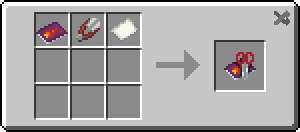
To start, craft a Fashion Magazine - this item lets you select uploaded costumes and apply them to mobs (by using the magazine on the mob in question).
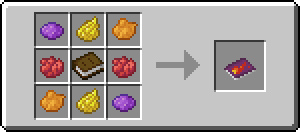
If you want to upload your own costumes (and have enough permissions to do so), craft a Fashion Scrapbook - it will let you upload, update and delete costumes.
Costume textures must be PNGs, but they can be any size, so you can make tons of mixels upscale textures to your desire.
Server owners and operators
Blazing Agenda supports permissions. For brevity, in the rest of the document "operators" means "operators or players with the corresponding permission."
Due to obvious issues relating to random players uploading questionable content to the server, Blazing Agenda only allows operators to upload skins by default.
If you are sure your players are good people, you can change the config (or use your favourite permissions mod) to allow everybody to manage assets. (Operators can always delete offending content)
Keep in mind that even operators are allowed a limited amount of costume slots (100 by default) and storage space (128 MB by default). These values can be changed through the config and permissions mods.